The lightning-fast, zero-bloat REST & HTTP API testing client. Preloaded with free public APIs, instant 1-click test execution, and 100% offline privacy with zero sign-up requirements.
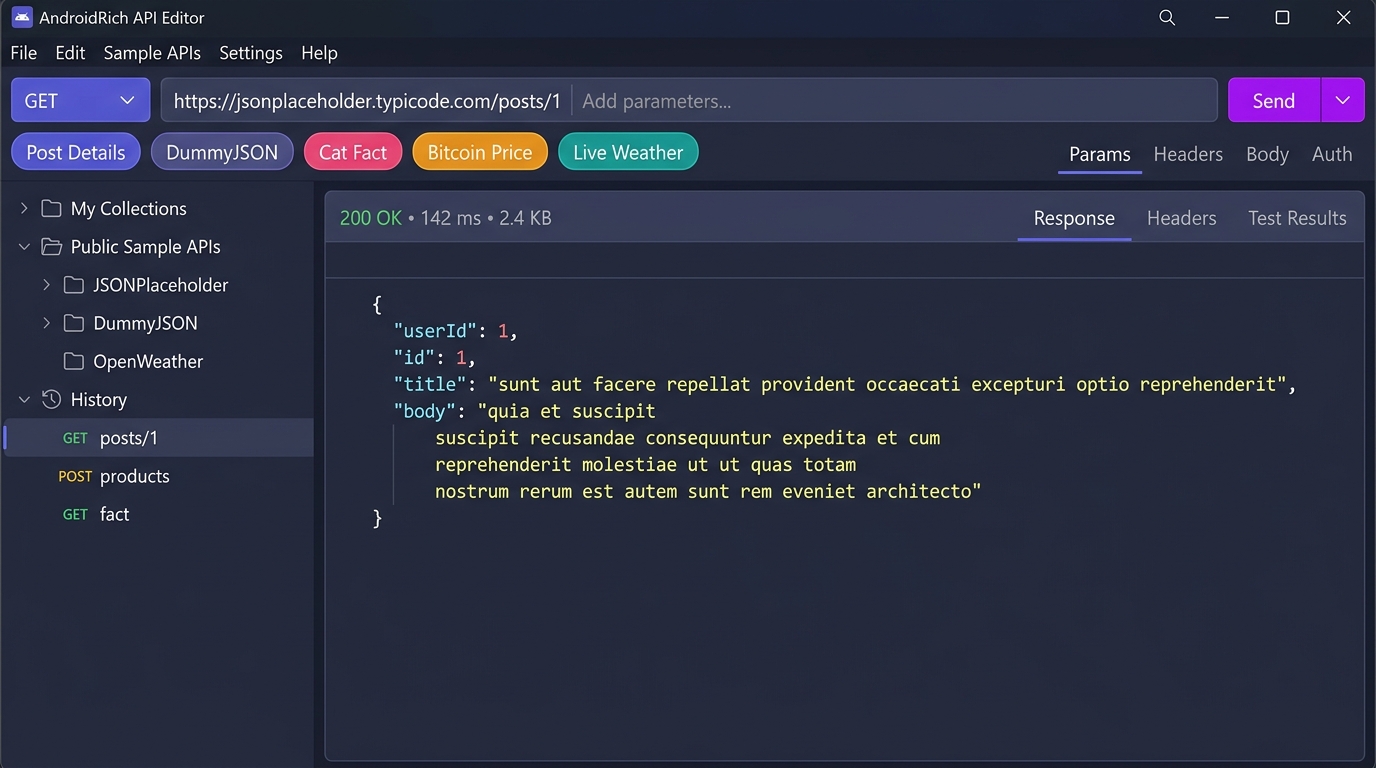
AndroidRich API Editor v1.0.0 running native on Windows 11 with dark mode, quick sample chips, and JSON syntax viewer.
Tired of having to create dummy accounts, look up mock data endpoints, or type long URLs just to test an HTTP response? AndroidRich API Editor comes equipped out-of-the-box with popular open public endpoints ready to fire instantly.
Select from Post Details, DummyJSON, Cat Fact, Bitcoin Price, or Live Weather.
No manual copy-pasting or header typing needed.
Review status code (200 OK), round-trip latency, byte size, and formatted JSON data.
Everything you need to test backend APIs, microservices, and mobile endpoints without the 800MB memory bloat of Electron-based tools.
Engineered natively using Flutter for Windows x64. Launches in a fraction of a second and uses under 80 MB of RAM while running.
Full support for GET, POST, PUT, DELETE, and PATCH. Send raw JSON bodies, form URL encoded data, and configure custom request headers.
Readable, formatted JSON responses with color coding for keys, values, booleans, and arrays, accompanied by HTTP response headers and stats.
Keep your API endpoints organized into project folders. Your history is recorded automatically so you never lose an endpoint.
No mandatory cloud sync, no forced workspace logins, and no telemetry scraping. All your request data and keys stay strictly on your PC.
Easily test local emulator URLs (like http://10.0.2.2:8080 or localhost) and inspect response schemas before writing Retrofit or Ktor models.
Comparing the essentials with typical API testing software.
| Feature | AndroidRich API Editor | Traditional Electron Clients |
|---|---|---|
| Installer Download Size | 11.5 MB (Compact) | 160 MB – 220 MB |
| RAM Usage (Idle) | ~70 MB – 90 MB | 800 MB – 1.4 GB |
| Cold Startup Time | < 1 second | 6 – 12 seconds |
| Mandatory Account / Login | None (100% Free & Offline) | Forced Cloud Sign-in |
| Built-in Public Test APIs | Included (6 1-Click Presets) | None (Manual configuration) |
| Localhost & Android Emulator Support | Full native LAN / 10.0.2.2 access | Limited or requires proxy config |
Click the download button to get AndroidRichApiEditorSetup.exe (11.5 MB).
Follow the clean Inno Setup wizard. Choose optional desktop and start menu shortcuts.
Open the app, select any of the Quick Samples, and hit Send. Zero configuration required!
http://localhost:3000, http://127.0.0.1:8000, or Android Emulator bridge addresses like http://10.0.2.2:8080.
Download AndroidRich API Editor for Windows today and streamline your development workflow.
Download Installer (11.5 MB .exe)